Saturday, December 11, 2010
CPA Lions 2010 - "Boys of Fall"
CPA Lions 2010 - Boys of Fall from Holly View Video on Vimeo.
Video produced for Christ Presbiterian Academy featuring Kenny Chesney performing the "Boys of Fall" (C) 2010 Arnie Barn.
This is a great song about high school football and a great song for a high school sports video.
Please visit the offical YouTube channel featuring the offical music video at the following link: Kenny Chesney - Offical Youtube Channel.
The song is available for download on Amazon at the following link:
Direct link to the offical music video:
http://www.youtube.com/watch?v=AlXDo5WhQXI


Wednesday, September 15, 2010
Sony HXRNX5U NXCAM
Sony NXCAM Model HXRNX5U
Now here is a camera to dream for. A real prosumer camcorder that records to solid state media.
 Product highlights: http://pro.sony.com/bbsc/video/channels-nxcam_camcorders/video-nxcam_nxcam_highlights/
Download product brochure (pdf) http://ws.sel.sony.com/PIPWebServices/RetrievePublicAsset/StepID/SEL-asset-186892/original/NXCAM_HXR-NX5U_v2454.pdf
Official Sony web product page: http://pro.sony.com/bbsc/ssr/product-HXRNX5U/
The street price is around $4K as of 9/2010
Also, don’t be fooled by the lesser version of the same Sony camera, HDR-AX2000, it is about $500 less, but don’t go for it. The HXRNX5U is the one to get. Update 7/24/12 - Actually people are swearing by the HDR-AX2000 out there on reviews, so maybe just compare the features that you want. The NX5 does seem to have more features, record modes, etc.
Also, be aware that the Sony HXR-FMU128, 128GB Flash Memory Unit is an extra $700. However, with the dual SDHC memory card slots, you really don’t need it.
Be sure that you get at least Class 6 SDHC memory cards or whatever Sony recommends. Class 10 would be even faster. May also require a good SDHC card reader if your laptop does not support SDHC.
Main Sony NXCAM site: http://pro.sony.com/bbsc/ssr/micro-nxcamsite/
Videomaker review:
http://www.videomaker.com/article/14904/
Older review on the prototype: http://www.youtube.com/watch?v=cxKe6NDicBE
There are also cool accessories of course like the VCTSP2BP Multi-purpose Camcorder Support System.
Product Review:
Sample footage:
From Product Specs:
Recording Frame Rate NTSC Mode
AVCHD FX (24Mbps) 1920x1080/60i
AVCHD FH (17Mbps) 1920x-1080/60i
AVCHD HQ (9Mbps) 1440x1080/60i
AVCHD LP (5Mbps) 1440x1080/60i
AVCHD FX (24Mbps) 1920x1080/24p
AVCHD FH (17Mbps) 1920x1080/24p
AVCHD FX (24Mbps) 1920x1080/30p
AVCHD FH (17Mbps) 1920x1080/30p
AVCHD FX (24Mbps) 1280x720/60p
AVCHD FH (17Mbps) 1280x720/60p
MPEG2 SD HQ (9Mbps) 720x480/60i
MPEG2 SD HQ (9Mbps) 720x480/60i (24p Scan)
MPEG2 SD HQ (9Mbps) 720x480/60i (30p Scan)
For Sony Rumors and News:
http://www.sonyalpharumors.com/
Now here is a camera to dream for. A real prosumer camcorder that records to solid state media.

Download product brochure (pdf) http://ws.sel.sony.com/PIPWebServices/RetrievePublicAsset/StepID/SEL-asset-186892/original/NXCAM_HXR-NX5U_v2454.pdf
Official Sony web product page: http://pro.sony.com/bbsc/ssr/product-HXRNX5U/
The street price is around $4K as of 9/2010
Also, don’t be fooled by the lesser version of the same Sony camera, HDR-AX2000, it is about $500 less, but don’t go for it. The HXRNX5U is the one to get. Update 7/24/12 - Actually people are swearing by the HDR-AX2000 out there on reviews, so maybe just compare the features that you want. The NX5 does seem to have more features, record modes, etc.
Also, be aware that the Sony HXR-FMU128, 128GB Flash Memory Unit is an extra $700. However, with the dual SDHC memory card slots, you really don’t need it.
Be sure that you get at least Class 6 SDHC memory cards or whatever Sony recommends. Class 10 would be even faster. May also require a good SDHC card reader if your laptop does not support SDHC.
Main Sony NXCAM site: http://pro.sony.com/bbsc/ssr/micro-nxcamsite/
Videomaker review:
http://www.videomaker.com/article/14904/
Older review on the prototype: http://www.youtube.com/watch?v=cxKe6NDicBE
There are also cool accessories of course like the VCTSP2BP Multi-purpose Camcorder Support System.
Product Review:
Sample footage:
From Product Specs:
Recording Frame Rate NTSC Mode
AVCHD FX (24Mbps) 1920x1080/60i
AVCHD FH (17Mbps) 1920x-1080/60i
AVCHD HQ (9Mbps) 1440x1080/60i
AVCHD LP (5Mbps) 1440x1080/60i
AVCHD FX (24Mbps) 1920x1080/24p
AVCHD FH (17Mbps) 1920x1080/24p
AVCHD FX (24Mbps) 1920x1080/30p
AVCHD FH (17Mbps) 1920x1080/30p
AVCHD FX (24Mbps) 1280x720/60p
AVCHD FH (17Mbps) 1280x720/60p
MPEG2 SD HQ (9Mbps) 720x480/60i
MPEG2 SD HQ (9Mbps) 720x480/60i (24p Scan)
MPEG2 SD HQ (9Mbps) 720x480/60i (30p Scan)
For Sony Rumors and News:
http://www.sonyalpharumors.com/
Tuesday, September 14, 2010
Saturday, August 28, 2010
Uploading and Playing Videos for Mobile Devices
Playing videos on mobile devices is very popular. Knowing for sure that your video upload will actually play on any given mobile device depends on several factors not the least of which is that the video streaming hosting site must support mobile video formats.
YouTube and Vimeo are two popular video streaming hosts that also allow embedding of videos into third party websites such as this blog or company sites.
YouTube’s web site has the ability to detect a mobile device. When browsing YouTube with a mobile device, the web site is smart enough to understand this and it only displays the special mobile version of the web site. The web pages are actually reformatted to allow YouTube mobile to fit comfortably on smaller mobile screens.
YouTube also has specially programmed standalone applications for devices, such as Windows mobile, that can be downloaded directly to the device. These applications allow searching for and playing YouTube videos, directly from the device, without having to browse the internet first.
More information on YouTube mobile is available at the following link: http://www.youtube.com/mobile
Vimeo does not seem to have similar standalone applications yet but does appear to be able to adjust to some mobile device formats. To activate this Vimeo feature, the mobile device user must browse to this special URL hosted on the Vimeo site: http://www.vimeo.com/m
On certain mobile devices such as the Apple iPod, the Vimeo site is reformatted to fit the device screen. This special site then allows the viewer to watch Vimeo videos streamed directly to the device.
The Vimeo mobile site still appears to be under construction. Navigating directly to a Vimeo video using an "m" in front of the short cut displays a mobile page for the video but does not allow playing of the video or any other interaction. Example: http://vimeo.com/m/14503700
Currently, Vimeo mobile device support appears to be limited to iPod, iPhone, iPad, and Android based devices such as the DROID.
For my testing purposes, I created and uploaded a high school sports video clip hoping to play Vimeo videos on mobile devices. The clip below was uploaded to three different hosting sites: Vimeo, YouTube, and Facebook.
The only mobile devices I currently have access to are iPod Touch, iPad, and Windows Mobile. The test Vimeo clip plays on the iPod and iPad, but not Windows Mobile. I still need to find someone with a Blackberry and other mobile devices to test with, but the results are listed below thus far.
Clip Title: CPA Lions 2010 vs Lexington Christian Academy - Interception
Test clip notes:
Camcorder: Canon HV30
Raw HDV Clip
Video: 29.970 fps interlaced, 1440x1080x12, MPEG-2
Audio: 48,000 Hz, Stereo, MPEG Layer 2
Rendered MP4 Clip in Sony Vegas Pro 9.0e
Audio: 128 Kbps, 48,000 Hz, 32 Bit, Stereo, AAC
Video: 29.970 fps, 1920x1080 Progressive, YUV, 6 Mbps
Pixel Aspect Ratio: 1.000
Profile: Baseline
Test Clip 1: Hosted on Vimeo
Test Clip 2: Hosted on YouTube
Test Clip 3: Hosted on Facebook
YouTube and Vimeo are two popular video streaming hosts that also allow embedding of videos into third party websites such as this blog or company sites.
YouTube’s web site has the ability to detect a mobile device. When browsing YouTube with a mobile device, the web site is smart enough to understand this and it only displays the special mobile version of the web site. The web pages are actually reformatted to allow YouTube mobile to fit comfortably on smaller mobile screens.
YouTube also has specially programmed standalone applications for devices, such as Windows mobile, that can be downloaded directly to the device. These applications allow searching for and playing YouTube videos, directly from the device, without having to browse the internet first.
More information on YouTube mobile is available at the following link: http://www.youtube.com/mobile
Vimeo does not seem to have similar standalone applications yet but does appear to be able to adjust to some mobile device formats. To activate this Vimeo feature, the mobile device user must browse to this special URL hosted on the Vimeo site: http://www.vimeo.com/m
On certain mobile devices such as the Apple iPod, the Vimeo site is reformatted to fit the device screen. This special site then allows the viewer to watch Vimeo videos streamed directly to the device.
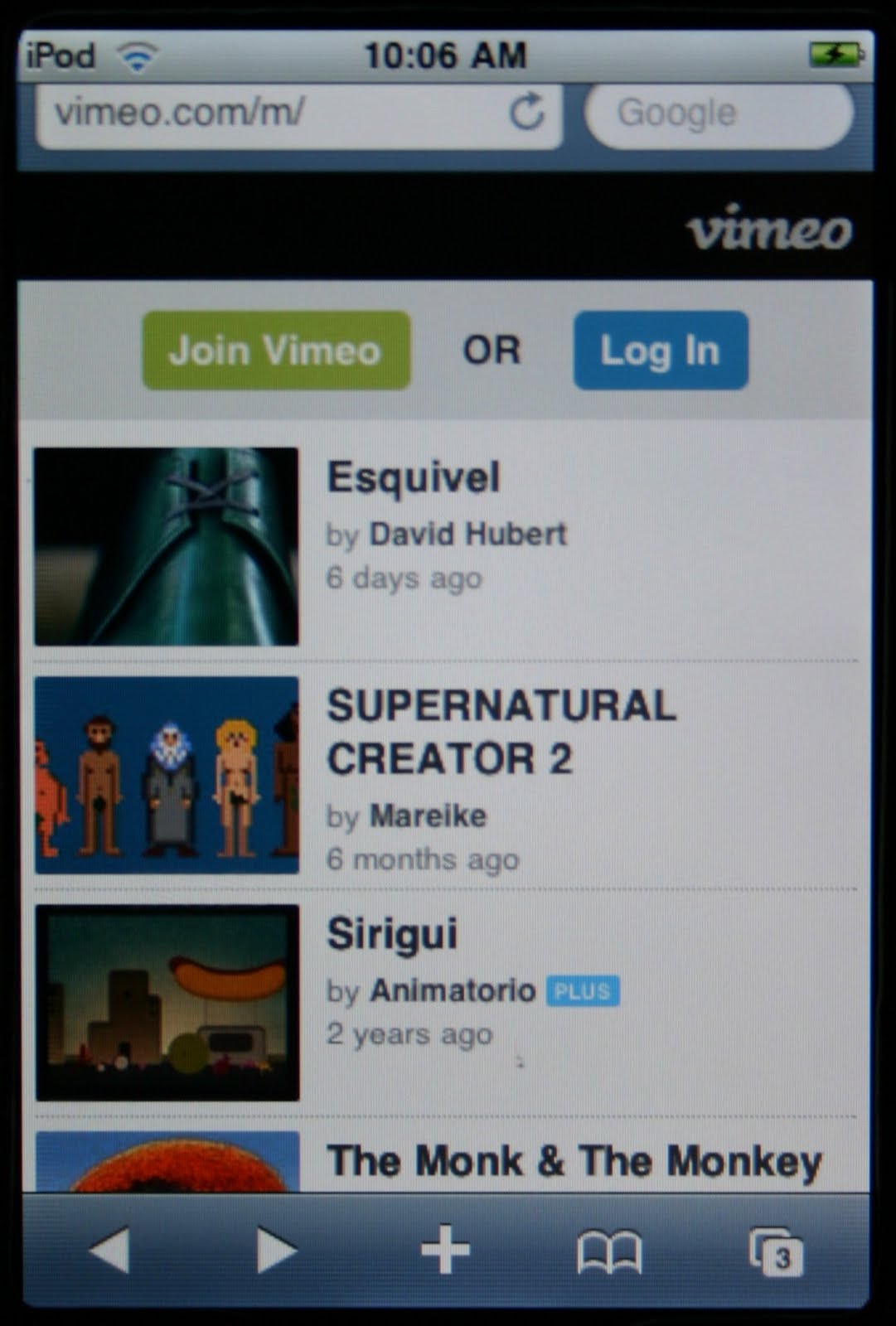 |  |  | ||
| Vimeo Mobile Site viewed on iPod | Selected Vimeo video viewed on iPod | Vimeo Mobile video played on iPod |
The Vimeo mobile site still appears to be under construction. Navigating directly to a Vimeo video using an "m" in front of the short cut displays a mobile page for the video but does not allow playing of the video or any other interaction. Example: http://vimeo.com/m/14503700
Currently, Vimeo mobile device support appears to be limited to iPod, iPhone, iPad, and Android based devices such as the DROID.
For my testing purposes, I created and uploaded a high school sports video clip hoping to play Vimeo videos on mobile devices. The clip below was uploaded to three different hosting sites: Vimeo, YouTube, and Facebook.
The only mobile devices I currently have access to are iPod Touch, iPad, and Windows Mobile. The test Vimeo clip plays on the iPod and iPad, but not Windows Mobile. I still need to find someone with a Blackberry and other mobile devices to test with, but the results are listed below thus far.
| Hosting Site | iPod | iPad | Windows Mobile | DROID | Blackberry |
| Vimeo | Yes | Yes | No | Yes | Unknown |
| YouTube | Yes | Yes | Yes | Yes | Unknown |
| No | No | No | No | Unknown |
Clip Title: CPA Lions 2010 vs Lexington Christian Academy - Interception
Test clip notes:
Camcorder: Canon HV30
Raw HDV Clip
Video: 29.970 fps interlaced, 1440x1080x12, MPEG-2
Audio: 48,000 Hz, Stereo, MPEG Layer 2
Rendered MP4 Clip in Sony Vegas Pro 9.0e
Audio: 128 Kbps, 48,000 Hz, 32 Bit, Stereo, AAC
Video: 29.970 fps, 1920x1080 Progressive, YUV, 6 Mbps
Pixel Aspect Ratio: 1.000
Profile: Baseline
Test Clip 1: Hosted on Vimeo
Test Clip 2: Hosted on YouTube
Test Clip 3: Hosted on Facebook
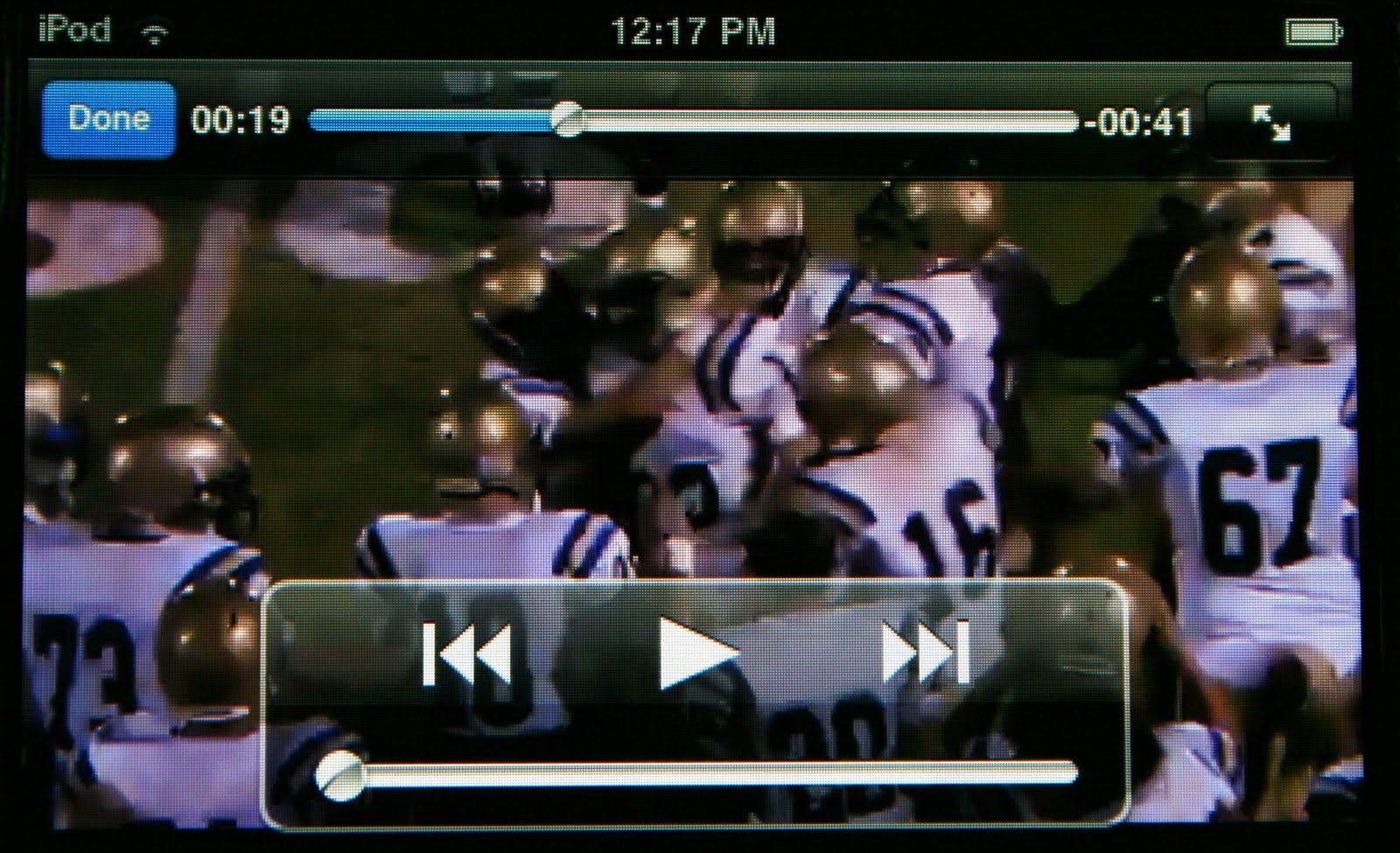 |
| Test Clip as Viewed on iPod |
Sunday, August 16, 2009
Shooting Sports Video for Slow Motion
In working with sports video, one of the problems I have run across is smooth motion and smooth slow motion.
The secret to really good slow motion video appears to start with the video camera itself.
As of now (2009) one of the cameras being touted as providing awesome slow motion potential is the RED ONE.
According to the informaiton on the RED ONE camera:
"Typical high-end HD camcorders have 2.1M pixel sensors and record with 3:1:1 color sub-sampled video at up to 30fps.
RED offers the Mysterium ™ Super 35mm cine sized (24.4×13.7mm) sensor, which provides 4K (up to 30 fps), 3K (up to 60 fps) and 2K (up to 120 fps) capture, and all this with wide dynamic range and color space in 12 bit native RAW. At 4K, that’s more than 5 times the amount of information available every second and a vastly superior recording quality.
In addition, you get the same breathtaking Depth of Field and selective focus as found in film cameras using equivalent 35mm P/L mount lenses. Mysterium ™ boasts greater than 66db Dynamic Range thanks to its large 29 sq. micron pixels. And 12,065,000 pixels deliver resolution that can only be called Ultra High Definition."
RED offers the Mysterium ™ Super 35mm cine sized (24.4×13.7mm) sensor, which provides 4K (up to 30 fps), 3K (up to 60 fps) and 2K (up to 120 fps) capture, and all this with wide dynamic range and color space in 12 bit native RAW. At 4K, that’s more than 5 times the amount of information available every second and a vastly superior recording quality.
In addition, you get the same breathtaking Depth of Field and selective focus as found in film cameras using equivalent 35mm P/L mount lenses. Mysterium ™ boasts greater than 66db Dynamic Range thanks to its large 29 sq. micron pixels. And 12,065,000 pixels deliver resolution that can only be called Ultra High Definition."
I found a great example of the type of slow motion available with this camera posted on Vimeo. To watch this video in high definintion, you will need to actually view the video from Vimeo, but this embedded video will give you a good idea of what's possible.
skate - shot on red #1347 - 120 fps from
Opus Magnum Production on
Vimeo.
Not having the tens of thousands of dollars this camera costs, my challenge is how to produce a good sports action video with slow motion on the equipment I currently own, the Canon HV30 HDV.
While the RED ONE can produce a frame rate of 120 frames per second, awesome depth of field, at fantastic ultra high resolution, the Canon HV30 is limted to three different frame rates - 24P, 30P, and 60i and 1440 x 1080 (HDV) resolution.
By the way, there is a good article on Canon HV30 frame rates posted on camcorderinfo.com. This article also disscusses what frame rate to use for posting videos to places like YouTube (30 fps).
Some of the best slow motion I have created using the Canon HV30 used a frame rate of 24p with a shutter speed of 1/2000, editing in Sony Vegas, and then rendered to a WMV at 30p for upload.
My production of a backyard hummingbird video showcases the result.
Humming Bird Slow Motion Sample from Holly View Video on Vimeo.
The problem with this video is that it seems to be missing some of the motion. Its an interesting effect to almost see the hummingbird wings frozen, but I want to try the same subject using a 60i frame rate. This should capture more of the orginal motion and then provide better a slow motion result after editing (I hope).
Wednesday, August 12, 2009
Videos shot from famous St. Martin beach gets you right in the middle of the action
What to do on vacation in Sint Maarten (St. Martin) when you've had enough sun? If you brought along your Canon HV30, then there are plenty of options.
One day I went over to Maho Beach and shot some footage of comings and goings at Sint Maarten's Princess Juliana Airport (SXM).
From the beach the planes fly directly over your head and man they come in close!
The two videos I produced where shot entirely handheld without a tripod (who wants to haul a tripod on vacation anyway) using my Canon Vixia HV30.
The first video features planes and the second video features jets.
I decided to post the videos on both Vimeo and YouTube. Vimeo seems to allow higher playback quality, but I am still trying to figure out exactly what the best rendering settings are for posting videos to either site.
Be sure to click the full screen control to enlarge the video if you like.
If you like the music included with the videos, I have included a song download link next to the video.
These were shot in High Definition with stock lenses, no filters, at 1080 60i, and then captured via firewire in Sony Vegas 8 on my laptop.
The video was then rendered in Sony Vegas 8 with some efforts on color correction using built-in filters.
I attempted some surround panning using the noise of the planes and attempted to mix sound levels of noise along with background music.
In case anyone is interested in the specs on the video rendering they are Video: 23.976 fps, 1280x720, WMV V9 CBR Compression, Smoothness 90. Audio: 384 Kbps, 48,000 Hz, 16 Bit, 5.1 Surround, WMA9 Pro.
Sony's description states: "Use this setting for high-quality HD video playback from a local hard drive."Video shot in August 2008.
One day I went over to Maho Beach and shot some footage of comings and goings at Sint Maarten's Princess Juliana Airport (SXM).
From the beach the planes fly directly over your head and man they come in close!
The two videos I produced where shot entirely handheld without a tripod (who wants to haul a tripod on vacation anyway) using my Canon Vixia HV30.
The first video features planes and the second video features jets.
I decided to post the videos on both Vimeo and YouTube. Vimeo seems to allow higher playback quality, but I am still trying to figure out exactly what the best rendering settings are for posting videos to either site.
Be sure to click the full screen control to enlarge the video if you like.
If you like the music included with the videos, I have included a song download link next to the video.
Princess Juliana Airport (SXM) Saint Martin Part 1 - Planes from Holly View Video on Vimeo. | |
Princess Juliana Airport (SXM) Saint Martin Part 2 - Jets from Holly View Video on Vimeo. |
These were shot in High Definition with stock lenses, no filters, at 1080 60i, and then captured via firewire in Sony Vegas 8 on my laptop.
The video was then rendered in Sony Vegas 8 with some efforts on color correction using built-in filters.
I attempted some surround panning using the noise of the planes and attempted to mix sound levels of noise along with background music.
In case anyone is interested in the specs on the video rendering they are Video: 23.976 fps, 1280x720, WMV V9 CBR Compression, Smoothness 90. Audio: 384 Kbps, 48,000 Hz, 16 Bit, 5.1 Surround, WMA9 Pro.
Sony's description states: "Use this setting for high-quality HD video playback from a local hard drive."Video shot in August 2008.
Subscribe to:
Posts (Atom)